Buyer Agents
Broadcast and Share with Gitcha
Gitcha is where your buyer's demand goes public - with your name on it. Syndicate a Want-Listing and you get share cards, social graphics and a public page, all pointed back at you.
What you'll learn
- What Gitcha is, and why it is not another lead portal
- What syndicating a Want-Listing to Gitcha actually unlocks
- Where to find your share card once syndication is on
- How to use share cards and auto-generated graphics for social and email
- When Gitcha generates postcards for sphere and farm campaigns
- What changes with a Gitcha premium subscription
Before you start
- At least one Want-Listing with the 'Syndicate to the public via Gitcha' option toggled on
Posting a Want-Listing inside BLS gets you your member network. Syndicating that Want-Listing to Gitcha takes it public - to your sphere, your social audience, your past clients, and people outside your network who may have what your buyer is looking for.
What Gitcha is, and what it is not
Every portal you have ever been pitched works the same way: it lists property, collects consumer interest, and sells that interest back to agents. Gitcha inverts all three.
It lists demand, not inventory. There is nothing on Gitcha for a consumer to browse and shop. What the public sees is buyers - real, represented, agent-posted asks. They are not shopping for a house; they are seeing what represented buyers want right now.
Your name is on it. The share card Gitcha generates carries your headshot, your brokerage and your contact. The public Want-Listing page names you as the buyer's agent. You are the expert with the buyer, and the whole artifact is built to say so.
Nobody buys the introduction. There is no marketplace for introductions here, no referral fee, no routing a response to whoever paid the most this month. Anyone who responds to your Want-Listing contacts you, because it is your Want-Listing.
The Want-Listing becomes marketing you own. The share card, the social graphic, the postcard - those are assets for your business. Post them, mail them, text them to a past client. They work whether or not anyone ever clicks back to Gitcha.
| A lead-gen portal | Gitcha |
|---|---|
| Lists property for consumers to browse | Lists buyer demand for the public to answer |
| Sells consumer interest back to agents | Sends responses straight to the posting agent |
| Your name appears if you pay for placement | Your name is on the listing by default |
| You rent access to their audience | You get assets to market to your own |
Tip
Tip: The fastest way to explain this to your sphere or a past client is the share card itself. "This is my buyer, and this is what they are looking for" lands very differently from "here is a listing I have for sale."
Where syndication lives in the form
At the bottom of the Want-Listing form, the Want-Listing Syndication section has two checkboxes. The first ("Visible to MLS Subscribers") is on by default. The second is what turns on everything in this guide:
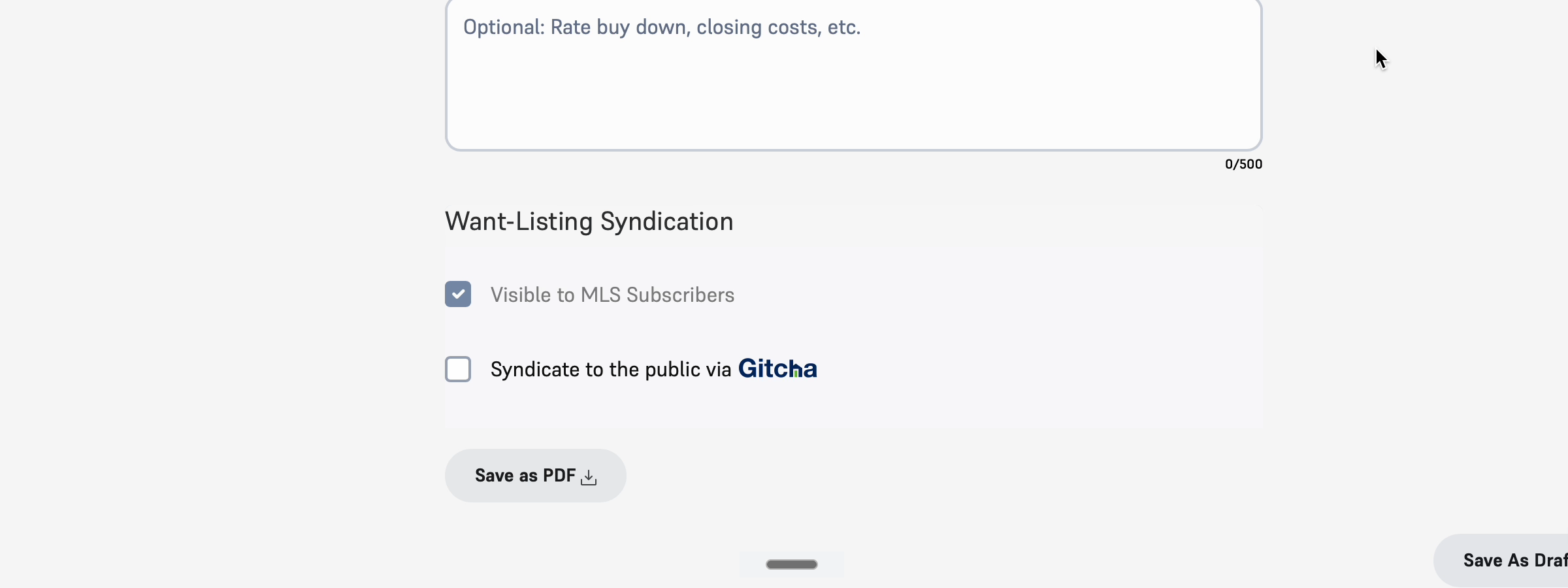
Toggle Syndicate to the public via Gitcha before publishing (or edit the Want-Listing later to flip it on). The rest of this guide is what unlocks once you do.
The amplification toolkit
When a Want-Listing is syndicated to Gitcha, you get a set of tools to share that demand outside the platform:
- Instant share cards - auto-generated graphics built from the Want-Listing's structured criteria. Drop them into social, email, or a text to a past client. No designer required.
- Social media exports - sized for Instagram, Facebook, LinkedIn, X. Same content, format adapted per platform.
- Postcards - mailable cards generated from the share card art for sphere campaigns and farm areas.
- Direct messages from the public - people on Gitcha who respond to the Want-Listing reach you directly through the platform.
The point is leverage. One Want-Listing turns into dozens of touchpoints across channels you don't have to build or maintain.
Where to find your share card
Open the Want-Listing from My Want-Listings and stay on the Want-Listing Details tab. Once syndication is on, a green Expand your sphere with Gitcha panel appears in the right-hand column.
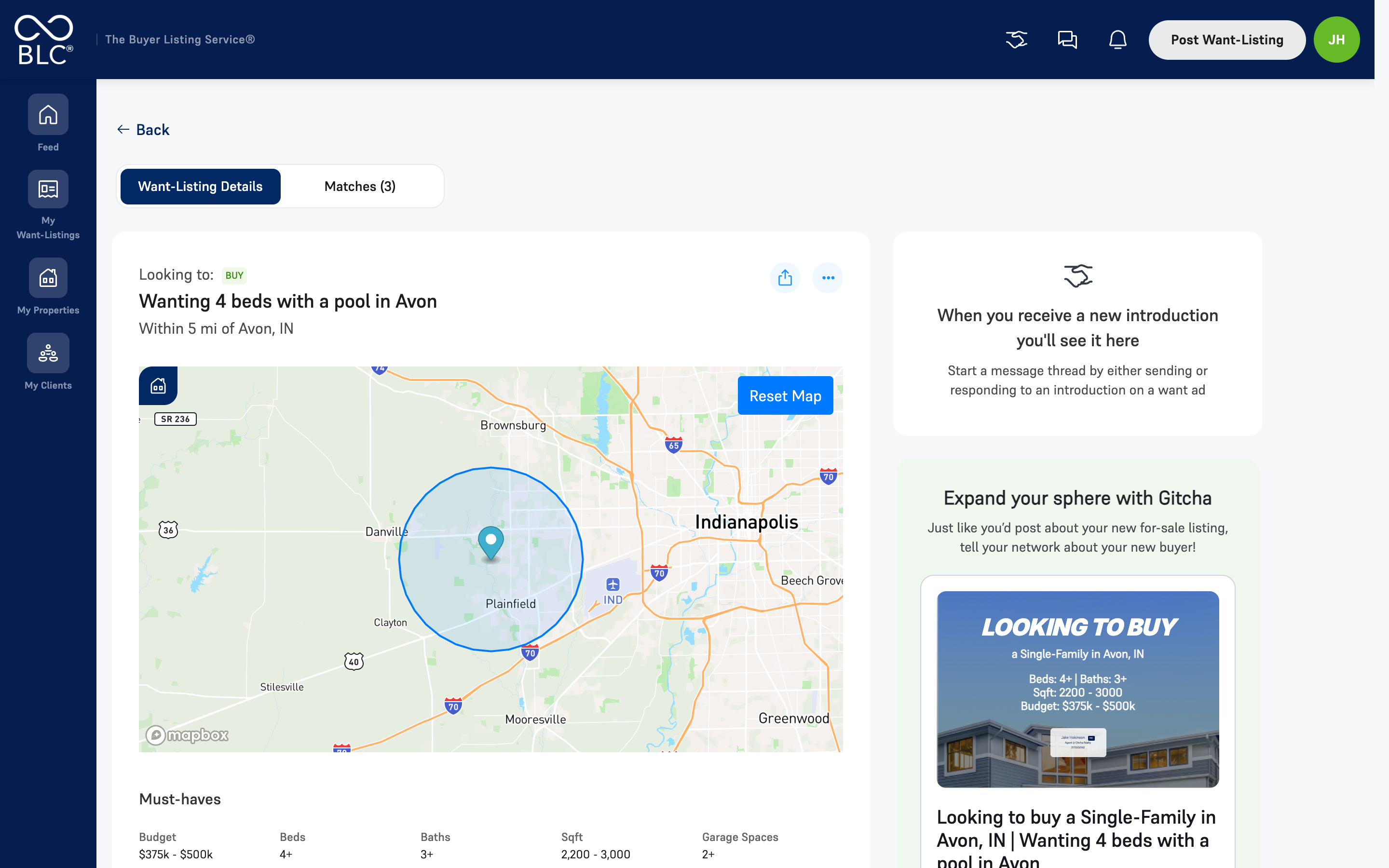
Inside it is the share card, generated from the Want-Listing's own criteria - property type, location, beds, baths, square footage and budget - over a property image, with your agent card on the front.
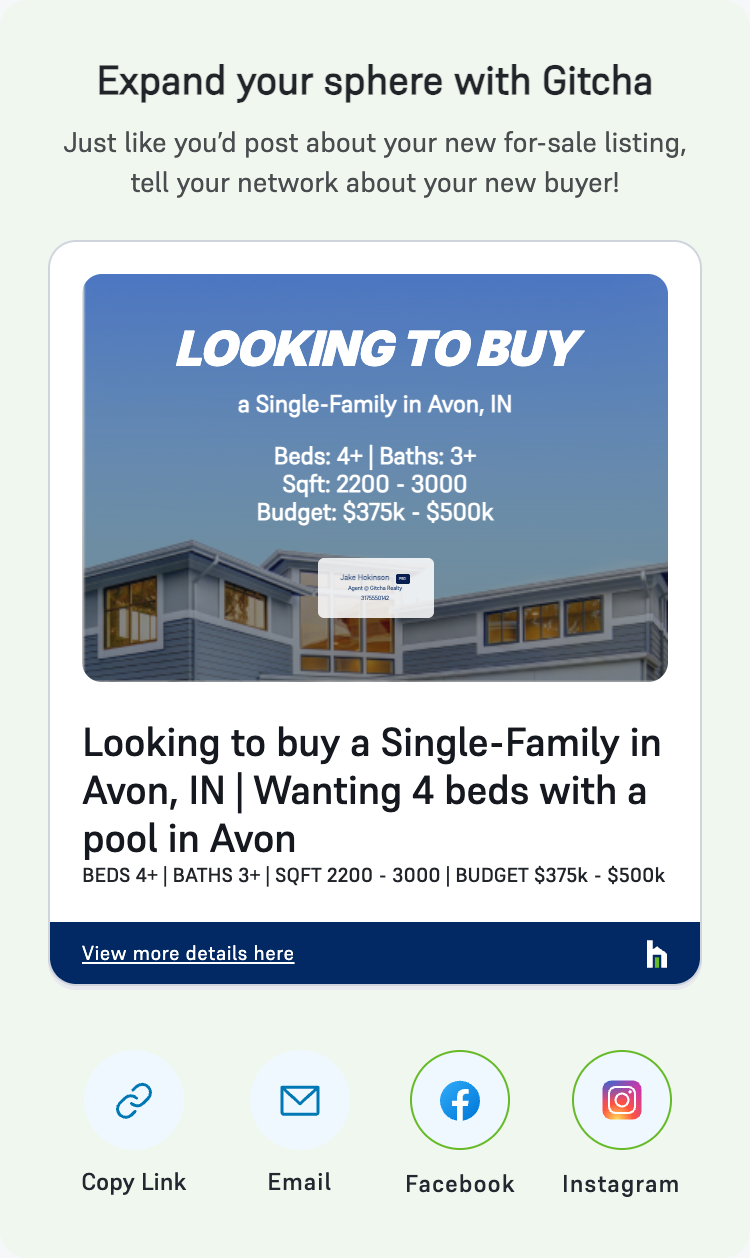
Four ways out of it, along the bottom:
- Copy Link - the public Gitcha page for this Want-Listing, to paste anywhere
- Email - opens a message with the card and link already in it
- Facebook and Instagram - post the graphic straight to your feed
View more details here opens the public page people land on, which is worth looking at once so you know what you are sending people to.
Note
Note: The card is regenerated from the Want-Listing, so editing the ask updates the card. Fix a budget or add a must-have and re-share; you do not need to ask anyone to rebuild the graphic.
What syndication looks like to consumers
When you syndicate, your Want-Listing becomes visible on Gitcha to the consumer side of the network. People on Gitcha can:
- See the Want-Listing as a real buyer ask
- Tap through to your agent profile
- Message you directly about the Want-Listing
This is how you start conversations outside your network without cold outreach. The consumer reaches out because the Want-Listing is relevant to them.
Gitcha premium unlocks more
The base Gitcha experience is included with BLS - syndication, share cards, inbound messages, basic profile. Gitcha premium adds:
- Enhanced agent bio - longer-form bio, headshot, brokerage badge
- Social media links on your public profile
- Client testimonials
- Custom buyer-listing form link you can share anywhere
- Boosted reach in Gitcha's consumer feed
Tip
Tip: Most agents see the biggest ROI from premium on the testimonials and the custom form link - both turn a Gitcha-curious consumer into a real conversation faster than the base profile.
How to think about it
Use syndication selectively. A Want-Listing you want to broadcast widely (a flexible buyer, broad criteria, urgency to find a fit) is a perfect candidate. A Want-Listing for a sensitive transaction (high-net-worth buyer, narrow off-market criteria) you may keep inside your network.
The toggle is reversible from the Want-Listing edit page - syndicate now, pull back later, with no penalty.
Common moves
- Post a Want-Listing, syndicate, share the social card the same day. Gets your client's ask in front of your network within minutes of publishing.
- Run a postcard campaign in the buyer's target zip when the Want-Listing has a tight geographic focus. Reaches people in that area who aren't on social.
- Lean on inbound for the long tail. Some Gitcha-driven conversations take weeks to surface. Patience is part of the system.